CaseNet MO Docket Entries
-
Docket Entries are the case activity records inside CaseNet MO that show filings, clerk remarks, updates, and document links tied to a court case
-
To open them, search for the case first, then go to the Docket Entries tab on the case details page to review history and clickable document links
-
Not every entry includes a document. Older filings before July 1, 2023, sealed records, and confidential information may not appear as public online links
Docket Entries in CaseNet MO help users review what has happened in a case. This section is often used to check filing activity, clerk notes, hearing-related updates, and available document links connected with the case record.
This page explains what docket entry are, what information may appear there, how to open them, how document links work, and why some records may not be available online.
What Are Docket Entries in CaseNet MO?
Docket Entries are the case activity records shown inside CaseNet Missouri. They help users follow the progress of a case by listing important actions, filings, and updates entered into the case history.
This section is commonly used when someone wants to review what has been filed, what events have been scheduled, or whether a public document link is available.
What You Can See in Docket Entries
The Docket entry section may show different types of public case activity depending on the case and the information available through CaseNet.
Filings
This part may show documents or submissions that have been filed in the case. It helps users see when something was added to the record and what type of filing appears in the case history.
Clerk Remarks
Some docket entries may include clerk remarks. These notes can provide added detail about a filing, event, or action connected with the case.
Case Updates
Docket Entries may also show updates tied to the movement of the case. This can include new activity, scheduled items, or other changes reflected in the public case record.
Document Links
When a public document is available, the docket entry may include a clickable link. This lets users open the document online through CaseNet.
How to Open Docket Entries
To open Docket entry in CaseNet MO, users usually need to search for the case first and then open the case details page.
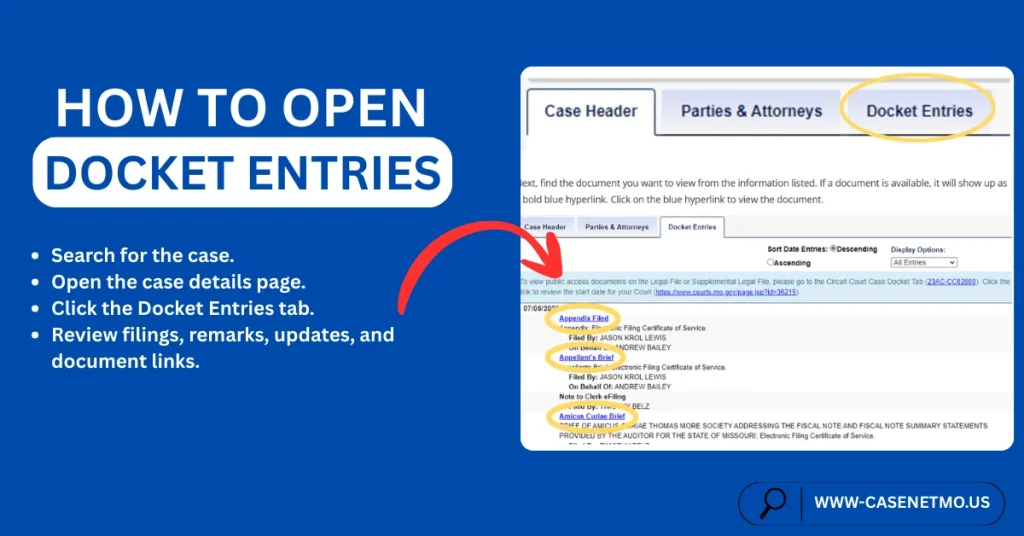
From there, the Docket Entries tab can be selected to review filing history, remarks, updates, and available document links connected with that case.
How to View Documents From Docket Entries
To view a document from Docket Entries, open the case and go to the Docket Entries section. Then look through the listed activity to find a clickable document link.
If a public document is available, the link may appear directly in that entry. Selecting the link can open the file for viewing, downloading, or printing when access is allowed.
Why a Document Link May Not Appear
Not every docket entry includes a document link. In some cases, the record may appear without any file being available for online viewing.
Common reasons are explained below.
Older Documents
Remote online document access generally applies to certain public documents filed on or after July 1, 2023. If a document was filed before that date, it may not appear as an online link in CaseNet.
Non-Public Records
Some case records are not available for public viewing. If a filing is restricted, sealed, or otherwise not open to the public, a document link may not appear.
No File Attached
A docket entry may show activity in the case without including a linked file. This means the entry is visible, but no online document is attached for public viewing through CaseNet.
Confidential Information
Some documents contain information that must be protected under court rules or other laws. In those situations, public online access may be limited, removed, or not shown at all.
Docket Entries and Public Document Access
Docket Entries are one of the main places where users check whether a public case document is available online. If a document can be viewed remotely, it is usually tied to the case activity shown in this section.
This is why many users open Docket Entries when they want to follow case history and check whether a public filing link is available.
Important Notes
- Docket Entries show public case activity only
- Not every entry will include a document link
- Older documents may not be available online
- Some records are restricted from public access
- Public document links depend on case type, filing date, and record availability
FAQs – Frequently Asked Questions
What are docket entry in CaseNet MO?
Docket Entries are the public case activity records shown inside CaseNet MO. They help users review filings, updates, remarks, and available document links.
Where do I find Entries in CaseNet?
You can find Docket Entries after opening a case in CaseNet. They usually appear as a separate tab on the case details page.
What can I see in Docket Entries?
You may see filings, clerk remarks, case updates, and document links when they are available in the public record.
Why is there no document link in my docket entry?
A link may be missing because the document is older, not public, not attached for online access, or connected with confidential information.
Can I open all docket entry documents online?
No. Only certain public documents may be available online through CaseNet.
Are older docket entry documents available online?
Documents filed before July 1, 2023 generally are not part of remote public online document access.
What does a document link in Docket Entries mean?
It usually means a public document is available to open through that case entry.
Can I check Docket Entries on my phone?
Yes. CaseNet was updated to work better on mobile devices, so users may review public case information from a phone browser.
About The Author
I am Christopher Taylor. I written this guide based on my personal experience. My intention is to provide helpful information about CaseNet and explain complicated terminology in a simple way.
I am not an official person, neither someone linked with official sources. My intention is purely to provide helpful information and, in return, earn some money from ads. If you need any legal advice, please contact directly to Missouri CaseNet Official Website.
If you would like to give feedback, please feel free to reach out to me at talktowendys36@gmail.com.
Regards,
Christopher Taylor