CaseNet MO
-
CaseNet MO is the official Missouri Courts portal that lets the public search court cases by name, case number, filing date, or scheduled hearing without visiting the courthouse
-
Public search needs no login, but account access is required for tools like eFiling, payments, and Track This Case updates
-
Only public court records appear in results. Sealed, juvenile, or restricted cases stay hidden, and the portal is available daily from 6:00 a.m. to 1:00 a.m. Central Time
CaseNet MO is the official online case search portal of the Missouri Courts that allows the public to access available court case records online.
This official portal helps users search cases by name, case number, filing date, or scheduled hearing and review important case details in one place.
It is a centralized public portal used across Missouri to check docket activity, hearing information, and case status through the official Missouri court system.
It also helps users follow publicly available court updates more efficiently through Missouri Courts CaseNet. Click on the given button to access the official courts.mo.gov/casenet website now.
www-casenetmo.us is an informational website only and does not provide legal advice. For legal guidance about your case, contact a licensed Missouri attorney. Please also note that court-issued notices do not come through CaseNet alerts or “Track This Case” updates.
What is CaseNet?
It is an online case search portal that allows the public to access Missouri court case information from one place.
You can use Missouri CaseNet to search cases, review docket entries and docket activity, check hearing details, and view available public records online.
Through this official portal, you can:
Who Can Use CaseNet?
It is for the general public, including case parties, family members, employers, journalists, and attorneys who need to look up public case search results and available Missouri court case information online.
Users may review public records such as docket entries, parties, judgments, charges, and other case details that are legally available through the official portal.
CaseNet only shows records for courts that use Missouri’s case management system and cases that are legally available for public access. Non-public, sealed, or restricted case details will not appear in public search results.
Requirements for CaseNet MO Search
To use CaseNet MO for case lookup, you need a few basic things before starting your search. Having the correct details ready helps improve search accuracy and reduces broad or incorrect results.
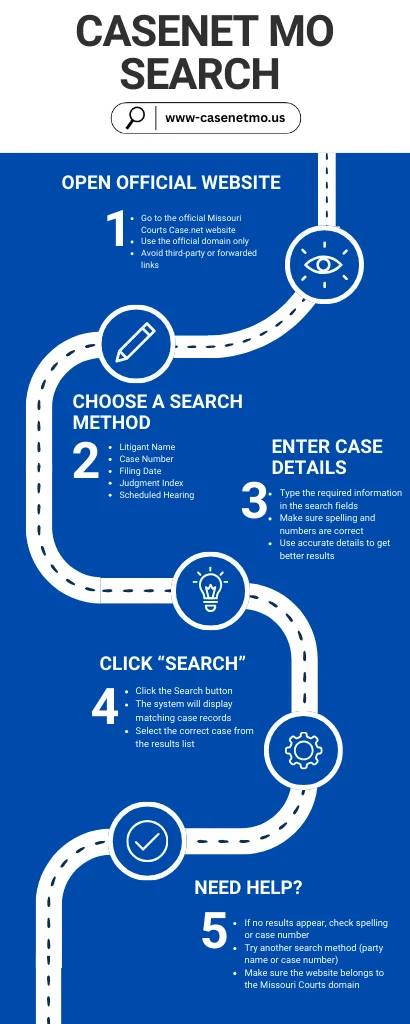
How to Search On CaseNet MO
To search on CaseNet, you need at least one detail such as a litigant name, case number, filing date range, or scheduled hearing date.
Courts.mo.gov/casenet offers more than one search option, so users can choose the method that best matches the information they already have.
Whether you are doing a basic case lookup or trying to narrow results with more accurate details, the available search tools make it easier to find the correct case.
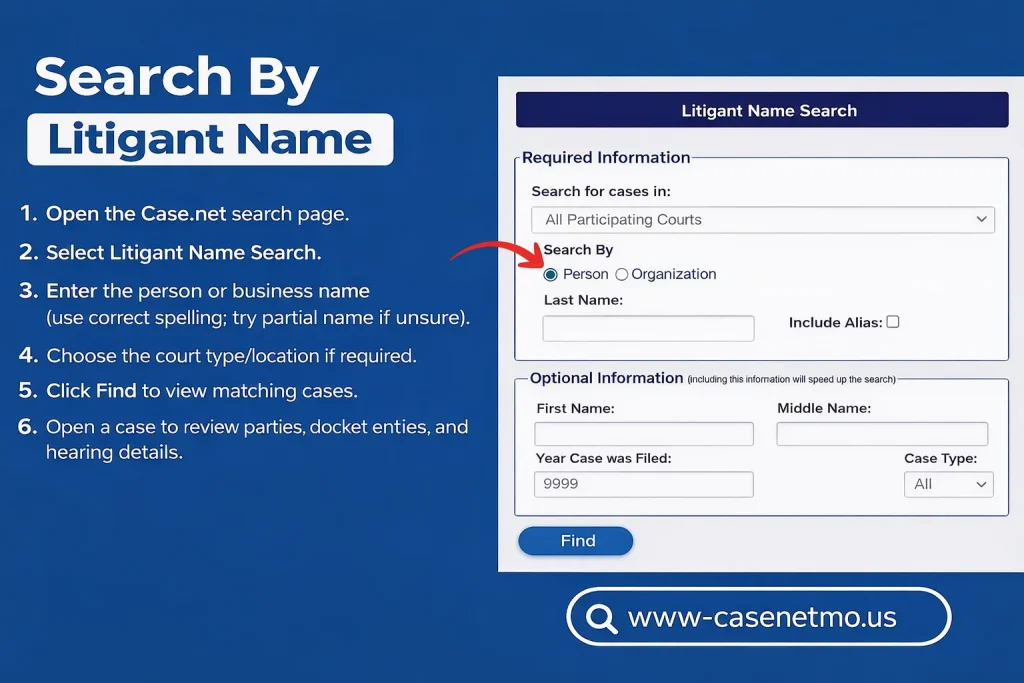
Search by Litigant Name
Litigant Name Search method when you want to do a search by name and do not have the case number.
This name search option helps users find public case records by entering the name of a person or business.
It is one of the most common ways to begin a case lookup when only basic party details are available.
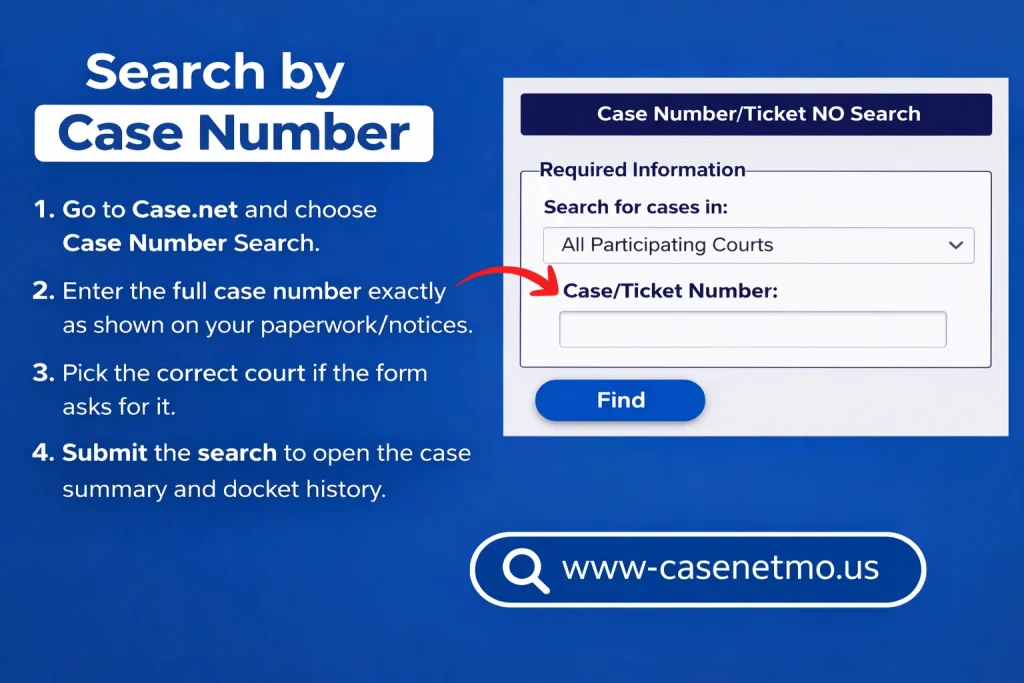
Search by Case Number
Use Case Number Search when you already have the exact case number.
This is usually the fastest and most accurate case lookup method because it opens the correct case more directly than a general search.
Case number search works best when the full number is entered exactly as shown on your court paperwork, notice, or other official record.
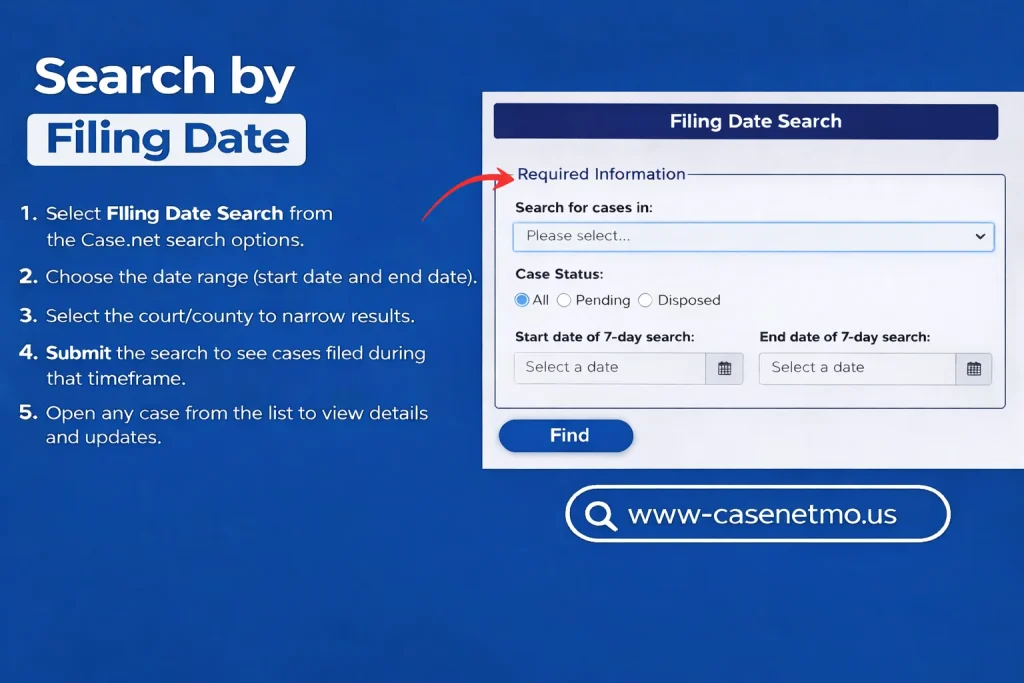
Search by Filing Date
Filing Date Search when you want to find cases filed during a specific period.
This option is useful when the exact case number is not available but you know the approximate filing date.
It can help narrow results by time and make the overall case search more focused.
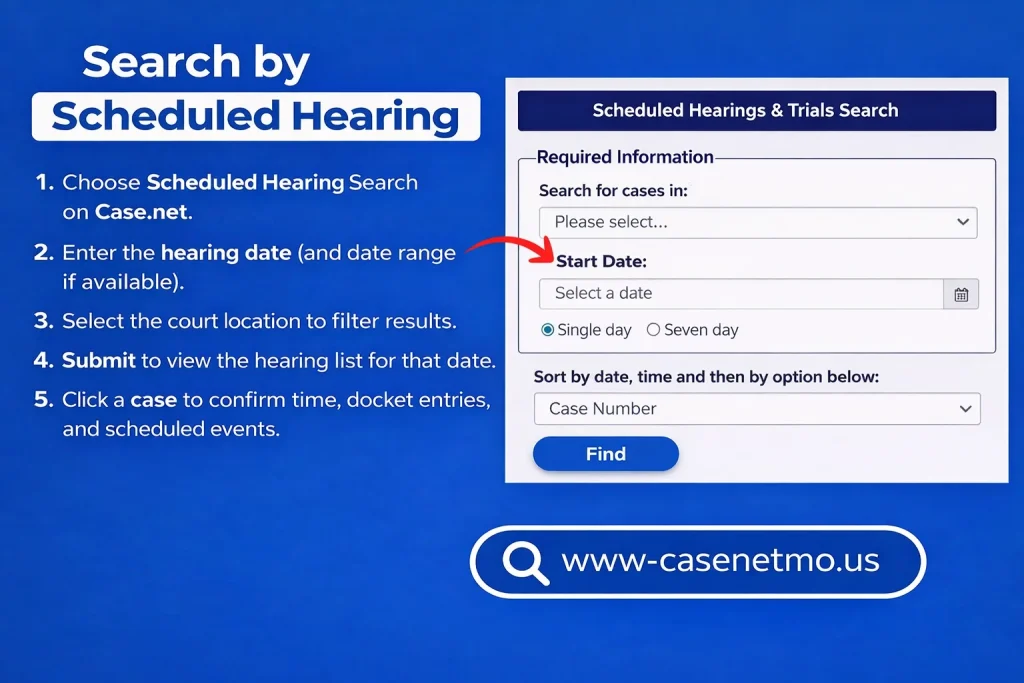
Search by Scheduled Hearing Search
Scheduled Hearings Search when you want to check hearings listed for a certain date or court location.
Those who want specific hearing information instead of using a full case number or party name can use the Scheduled Hearings search method.
It can help users find listed court events and open related case details from the search results.
Note: CaseNet shows public case information only. If results do not appear, try a different spelling, confirm the court or county, remove extra spaces, or use another browser. Also, the old www2.courts.mo.gov has been decommissioned, and the new URL is www.courts.mo.gov.
How to Track a Case on CaseNet
Case.Net MO includes a Track This Case feature that allows users to follow updates on a specific case.
After tracking is enabled, you may receive notifications when new docket activity, docket entries, or scheduled events are added, where that option is available.
This can help users stay aware of changes in case status without repeating the same search again and again.
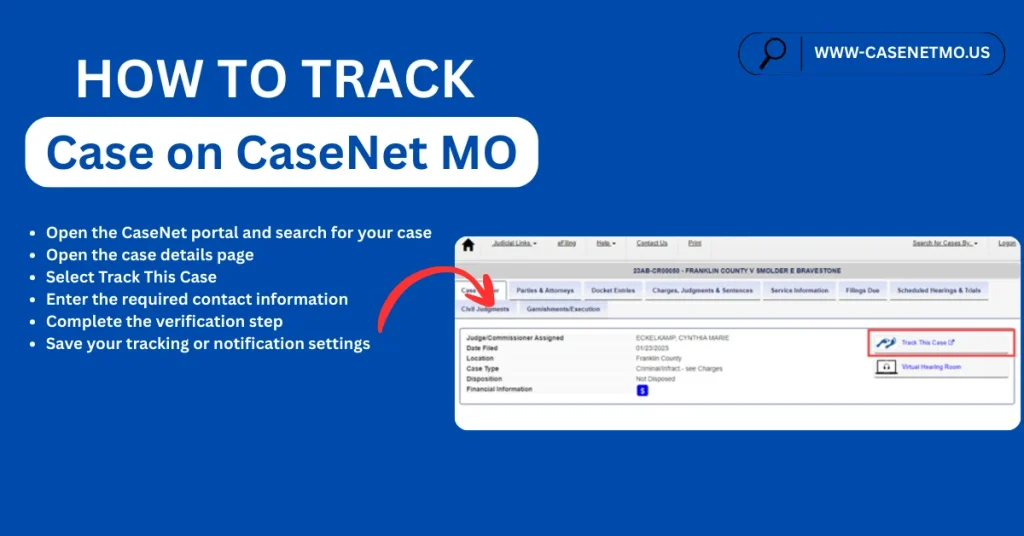
Follow these steps to track a case:
How to Make a Payment
To make a payment, you usually need your case or payment details such as a case number, court location, and amount due.
If online payment is available for your matter, use the official portal and follow the below steps:
Note: Payment availability depends on the case and court. If the online payment option is missing, contact the court directly for payment instructions.
Who Can Use eFiling (For Attorneys)?
e-Filling is for licensed Missouri attorneys who have registered for a secure Missouri Courts account and are authorized to use the Missouri eFiling system to file new cases or submit documents in existing cases.
This access is generally meant for approved legal users who need account-based filing tools through the official Missouri court system.
In some situations, approved agencies or authorized users may also use the same system where applicable.
CaseNet Availability
Missouri CaseNet system is generally available on weekdays from 6:00 a.m. to 1:00 a.m. Central Time.
Access may be limited outside these hours or during maintenance periods or rush hours reasons
If the system appears temporarily unavailable, users should check the official Missouri Courts announcements and system unavailability updates for service notices or interruptions which appear on the Homepage in the notice section.
Mobile Access
Case.Net system can be accessed through a mobile browser. There is no need to rely on unofficial third-party apps to view public case information.
Users can open the official website (Courts.mo.gov/casenet/welcome.do) on a phone browser and use the same public portal search options available on desktop.
Important: Use only the official Missouri Courts domain for access. Beware of fake phishing websites.
Scam Alert: If you notice anything related to spam, you can reach out to the Missouri State Courts Administrator’s Help Desk toll-free at (888) 541-4894 or by email at OSCA.Help.Desk@courts.mo.gov.
What If My CaseNet Account Gets Locked?
If your secure Missouri Courts account gets locked, it may happen after repeated failed sign-in attempts or incorrect login details. Public case search does not usually require a login, but some account-based tools may need secure access.
1) Try the password reset option first
- Go to the sign-in area
- Select the password reset or recovery option
- Use the email linked to your account
- Follow the reset instructions sent to your inbox
2) If you still cannot access the account
Contact the official support desk for technical help.
3) After access is restored
- Sign in again
- Update your password if needed
- Review your recovery details for future access support
Note: Public case search does not usually require a login. Account access is mainly used for secure tools such as eFiling, case tracking, or other user-specific features.
Key Features
Here is an in-depth look at the main features available through CaseNet MO for public case lookup and court record access:
Benefits for CaseNet Users
It gives Missouri users more than just a basic case lookup tool. It also helps people review available public records and follow court case records online with fewer steps.
Overall, it helps users stay informed through publicly available court records.
Official Support and Contacts
For technical help related to CaseNet Missouri, eFiling access, or account-related issues, users can contact the OSCA Help Desk through the official Missouri Courts support channels:
For court-specific questions such as hearing details, copies, or local payment matters, users should contact the relevant court clerk directly.
FAQs – Frequently Asked Questions
Why is my CaseNet case not showing up?
New filings may not appear right away. Some cases may also be sealed, restricted, or unavailable in public search results. For a more accurate result, use case number search if that detail is available.
Why can’t I see a family, custody, or minor-related case on CaseNet?
Some case types have privacy protections under court access rules. In those situations, public access may be limited or unavailable through the official portal.
How do I use “Track This Case” to get updates?
Open the case in CaseNet MO, select Track This Case, enter the required contact information, complete verification, and save your settings. This feature may help you follow new docket activity where tracking is available.
Why is the payment option missing for my case?
Not every case is payable online. Some payments must be handled through the court directly, depending on the case type or court location.
What is the best way to search on Case.Net ?
Case number search is usually the most accurate option. If you do not have the case number, use litigant name search and narrow the results with the correct court or location filters.
What is the website for CaseNet in Missouri?
courts.mo.gov/casenet is the official Missouri Courts CaseNet website. It is the public portal for searching available court case records, viewing case details, and checking docket activity online. For accuracy and safety, always use the official Missouri Courts website.
About The Author
I am Christopher Taylor. I written this guide based on my personal experience. My intention is to provide helpful information about CaseNet and explain complicated terminology in a simple way.
I am not an official person, neither someone linked with official sources. My intention is purely to provide helpful information and, in return, earn some money from ads. If you need any legal advice, please contact directly to Missouri CaseNet Official Website.
If you would like to give feedback, please feel free to reach out to me at talktowendys36@gmail.com.
Regards,
Christopher Taylor